PHONE TO PHONE TRANSFER & DATA MIGRATION

Move Your Phone Data. Start Fresh Without Losing Anything.

Smart Transfer App works across Android phones, iPhones, tablets, and iPads, making it easy to move your data when switching devices. Phone to phone transfer is one of our core features, allowing you to move photos, videos, apps, contacts, messages, and other content types reliably over a wireless connection.

⭐ ⭐ ⭐ ⭐ ⭐

Trusted by millions of users worldwide

...

Move Your Data Across Devices

Smart Transfer App is designed to help you move what matters from one device to another, whether you’re switching between Android phones, moving from Android to iPhone or iPhone to Android, upgrading within iOS, or setting up a tablet. The process stays simple and gives you full control at every stage.

Install Smart Transfer app step to start clone phone data transfer process.

Install the Smart Transfer App

Download and install Smart Transfer App on both devices to begin your phone to phone transfer. Set your old device as the Sender and your new device as the Receiver. The app supports transfers between Android phones, iPhones, and tablets.

Connect devices step for secure phone to phone clone connection.

Connect Your Devices

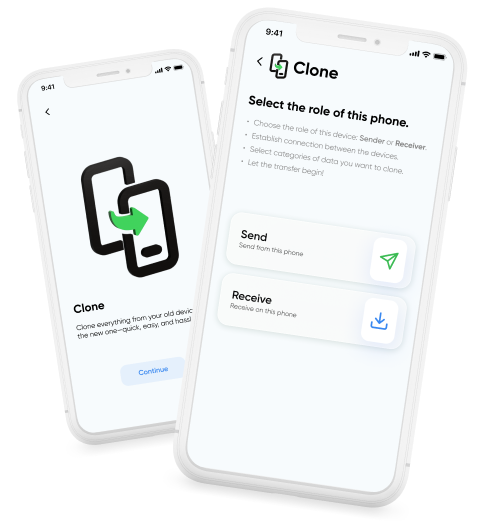
Open Smart Transfer App on both devices and select the Clone module. Assign Sender and Receiver, then connect the devices using a QR code or passcode to start the transfer.

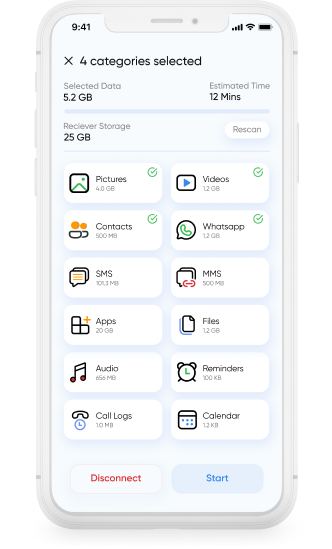
Choose data to transfer during clone phone process including apps, photos, and contacts.

Choose What to Transfer

Select the data you want to move to your new phone, including photos, videos, apps, contacts, WhatsApp data, SMS, MMS, files, audio, reminders, call logs, and calendar entries. You stay in control of what transfers and what stays behind.

Start clone phone process to transfer data from old phone to new phone.

Start the Clone Process

Begin the phone data migration and let Smart Transfer App move your selected data directly to the Receiver device. Progress is shown clearly so you can monitor the transfer as it completes.

Review selected data before starting phone clone transfer.

Review and Continue

Once the transfer is complete, review your data on the new phone or tablet to make sure everything is in place. You can then go back to any other old phones you have and transfer their data as well, bringing everything together on one device.

A Smarter Way to Migrate Mobile Data

Smart Transfer App is built for accurate phone to phone transfer and smooth data transfer across devices. It supports everyday phone switching and data migration, making it easy to move data to a new device.

Bulk data transfer screen showing multiple files transferred during clone phone process.

Clone and Share Serve Different Needs

Smart Transfer App offers two distinct options. The Clone feature is designed for moving multiple data types at once when switching phones. Share is intended for sending individual files when you only need to move specific items.

Bulk data transfer screen showing multiple files transferred during clone phone process.

Bulk Data Transfer Across Devices

The Clone feature supports bulk data migration in a single process when setting up a new phone or tablet. It works across old and new devices, following a clear, guided transfer process.

Bulk data transfer screen showing multiple files transferred during clone phone process.

Works Across Phones and Tablets

Smart Transfer App supports phone to phone transfer between Android devices, iPhones, and tablets. This makes switching platforms or setting up a new device straightforward, regardless of the operating system.

Bulk data transfer screen showing multiple files transferred during clone phone process.

Uses Secure Wi-Fi or Hotspot Connections

Transfers are performed using your secure Wi-Fi connection or personal hotspot, keeping the process stable during home upgrades or on-the-go device changes.

Bulk data transfer screen showing multiple files transferred during clone phone process.

Simple and Intuitive by Design

The same clean, intuitive interface works across Android and iPhone. Each step follows a consistent flow, making phone switching easy for first-time users and familiar across devices.

Download Smart Transfer App

Move your mobile data with confidence. Smart Transfer App makes phone to phone transfer simple, helping you move data to a new phone through a reliable wireless process.

FAQs

Q1. What does the Clone feature do?
It allows you to migrate phone data from one device to another, creating a complete copy of your photos, videos, contacts, apps, and files.
Q2. Is Smart Transfer App a clone data app for both Android and iPhone?
Yes. It supports Android-to-Android, iPhone-to-iPhone, and cross-platform phone data transfer, making it a versatile data transfer app.
Q3. How fast is the cloning process?
Smart Transfer App is designed to move data faster than Bluetooth and traditional wired options, making phone switching quicker and more convenient.
Q4. Can I choose what data to transfer?
Yes. You can move everything at once with the Clone feature or select specific items such as photos, videos, contacts, apps, messages, and documents with the Share feature.
Q5. Can Smart Transfer App transfer apps?
  • On Android, supported apps can be transferred.
  • On iPhone, transferring apps is limited because of iOS restrictions.
Q6. Do I need cables or a computer to clone my phone?
No. Smart Transfer App works wirelessly, so you can move your data without cables or a computer.